Deconstructing Reality Composer Pro (Inspector Components)


The previous inspector series parts explored attributes that map cleanly to USD: transforms, material bindings, and variant sets. Components are different.
One might expect that RCP's component inspector would just show RealityKit components attached to entities—the same components you'd add in code at runtime. But RCP operates at the USD authoring level. What looks like "adding a component" in the inspector is actually mutating .usda structures that realitytool will later compile into RealityKit. Users are not configuring "real" components when working in RCP; they're creating USD that describes them.
This creates a situation where the mapping isn't direct. Clicking "Add Component" in the UI produces wildly different USD output depending on the specific component being added. A scalar attribute. A nested prim hierarchy. A relationship to another prim. Or sometimes nothing is written to disk at all.
So what?
Understanding that RCP mutates USD rather than configuring RealityKit directly explains a lot of the friction users encounter. The silent failures, the components that are not enabled until mysterious prerequisites are met, and the UI that seems to ignore your input (and locale)—these aren't bugs in the traditional sense. These symptoms result from a layered system where the inspector acts as a facade for USD authoring, and the actual RealityKit components come into existence only after realitytool compiles.
Fixtures and diffs
Apple doesn't document this. So we had to figure it out by diffing.
#usda 1.0
(
    customLayerData = {
        string creator = "Reality Composer Pro Version 2.0 (494.60.2)"
    }
    defaultPrim = "Root"
    metersPerUnit = 1
    upAxis = "Y"
)

def Xform "Root"
{
    def Cube "Cube" (
        active = true
        prepend apiSchemas = ["MaterialBindingAPI"]
    )
    {
        rel material:binding = </Root/Cube/DefaultMaterial>
        double size = 0.2
        quatf xformOp:orient = (1, 0, 0, 0)
        float3 xformOp:scale = (1, 1, 1)
        float3 xformOp:translate = (0, 0, 0)
        uniform token[] xformOpOrder = ["xformOp:translate", "xformOp:orient", "xformOp:scale"]

        def Material "DefaultMaterial"
        {
            prepend token outputs:surface.connect = </Root/Cube/DefaultMaterial/DefaultSurfaceShader.outputs:surface>

            def Shader "DefaultSurfaceShader"
            {
                uniform token info:id = "UsdPreviewSurface"
                color3f inputs:diffuseColor = (1, 1, 1)
                float inputs:roughness = 0.75
                token outputs:surface
            }
        }

+        def RealityKitComponent "Accessibility"
+        {
+            uniform token info:id = "RealityKit.Accessibility"
+            bool isEnabled = 1
+            string label = "A custom accessible label"
+            string value = "This component will make accessible my entity"
+        }
    }
}
When you add an accessibility component to a cube, this code is generated
To figure out what each component actually does, we built fixtures: minimal scenes with one entity. Add a component, diff the .usda. Change one parameter, diff again. Repeat for every parameter on every component.
The results are sometimes nested types we're still guessing at, and there's interaction between components that complicates things. It sure is a best-effort process, but it's the only systematic way to map the relationship between inspector parameters and file changes that we have found so far.
Grouping by authoring pattern
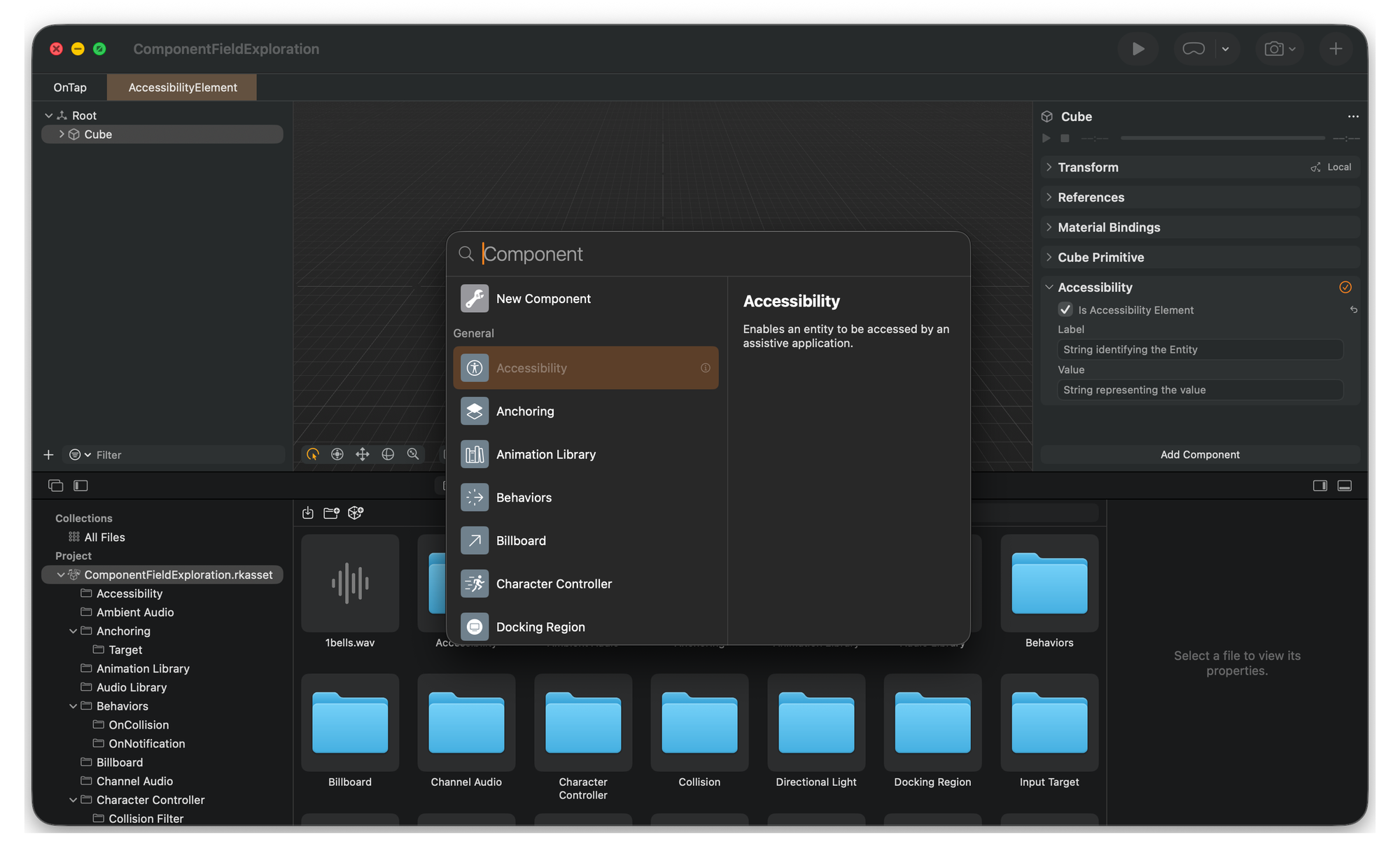
RCP's inspector organizes components by purpose—general, audio, lighting, physics—which makes sense for users. For our purposes, it's more useful to group them by how they manipulate USD. So far, six patterns:
Scalar—Key/value attributes on a single prim.
Accessibility, Billboard, Opacity, many light fields.
Structured—One component in the UI, nested child prims underneath.
SpotLight shadow blocks, Collision shapes.
Resource index—Manages collections via dictionaries or child prim lists.
AudioLibrary, AnimationLibrary.
Cross-prim reference—authors' relationships to other prims; behavior depends on scene topology.
Model Sorting groups, IBL receiver links.
Dependency-driven—UI only valid when prerequisites exist.
Audio preview requires AudioLibrary; Model Sorting requires a group prim.
UI-only—Controls that don't modify the .usda at all. More on this later.
Exhibit A: Model Sorting, multiple-layer authoring
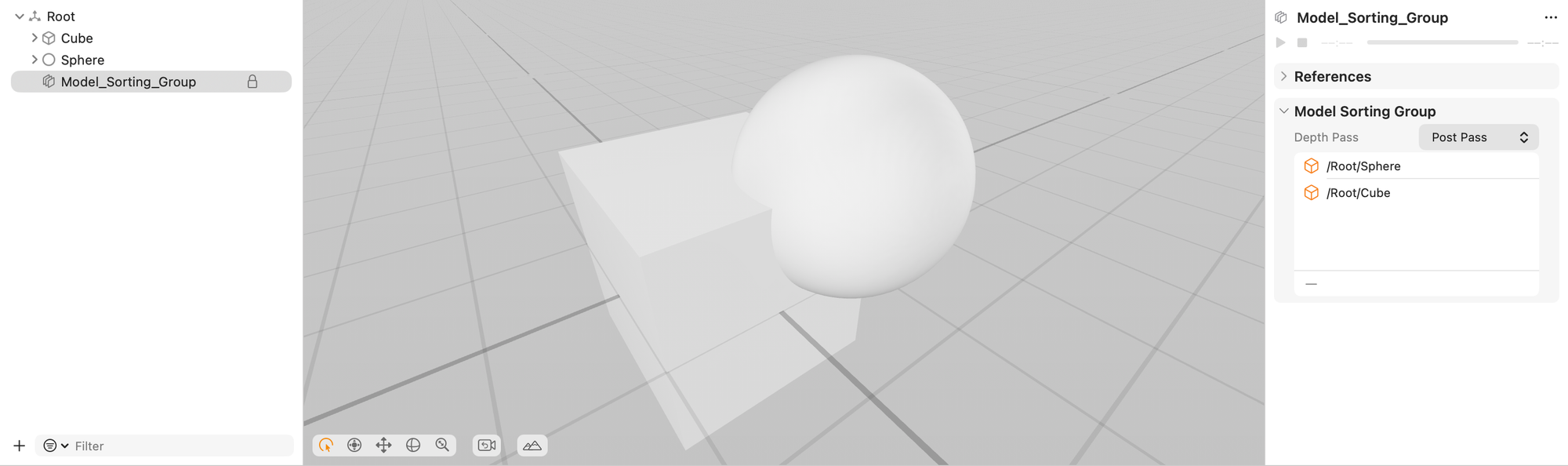
Model Sorting is a good example of compound functionality—and it's not even the most complicated. After assembling the pieces (components on each entity, creating a sort group in the hierarchy toolbar, etc.), the result spreads across three locations:
Per-entity membership links to a shared group:
rel group = </Root/Model_Sorting_Group>The group prim holds group-wide behavior:
def RealityKitMeshSortingGroup "Model_Sorting_Group"
    token depthPass = "prePass"
Each entity also stores its own draw order:
int priorityInGroup = 2One inspector panel, three USD locations. This "component" is clearly more like a reference graph.
Exhibit B: Behaviors DSL
Behaviors are the most layered example we've found. A single "behavior" component in RCP becomes a small graph structure in USD:
The entity gets a container component:
def RealityKitComponent "RCP_BehaviorsContainer"
    info:id = "RCP.BehaviorsContainer"
    rel behaviors = [</Root/Entity/OnTap>]
Each behavior is a node linking triggers and actions:
def Preliminary_Behavior "OnTap"
    rel triggers = [</Root/Entity/OnTap/TapTrigger>]
    rel actions = [</Root/Entity/OnTap/SpinAction>]
Triggers and actions have their own attributes—collider references, notification identifiers, and animation targets:
def Preliminary_Trigger "TapTrigger"
    token info:id = "TapGesture"
    rel affectedObjects = [</Root/Entity>]

def Preliminary_Action "SpinAction"
    token info:id = "SpinAction"
    float3 axis = (0, 1, 0)
    float duration = 1.0
One "Add Behavior" click, four prims created, and multiple relationships established. The inspector does its best to hide this completely.
The curious case of UI-only controls
Some inspector controls don't write to .usda at all. The Animation Library's Frames/Seconds toggle is one of those—flip it back and forth, diff the file, and nothing changes. It looks like it's serving as a purely runtime preview state, acting as a hint forrealitytool passed in another (TBF) way?.
Implications for Deconstructed
We're about 80% done cataloging the components available from RCP. "Custom Components" is one of the most fascinating ones left. Nonetheless, the process has already produced some useful artifacts beyond Deconstructed:
- Zed official usd extension, to facilitate manual validation
- Unncannyuse, a compatibility table website, looks like the perfect place to share more about the empiric results of component schemes manipulation
- Fixtures for diff-based reverse engineering of Reality Composer Pro component authoring in USDA
- Observable notebook evaluating cross-platform situation👇
 elkraneo

 Keith Harrison